
Editing, Making changes, Updating Quotas
You may need to make changes to your Campaign along the way!
To Edit your Campaign from your dashboard, you can either select the Campaign name or the edit button as seen here:

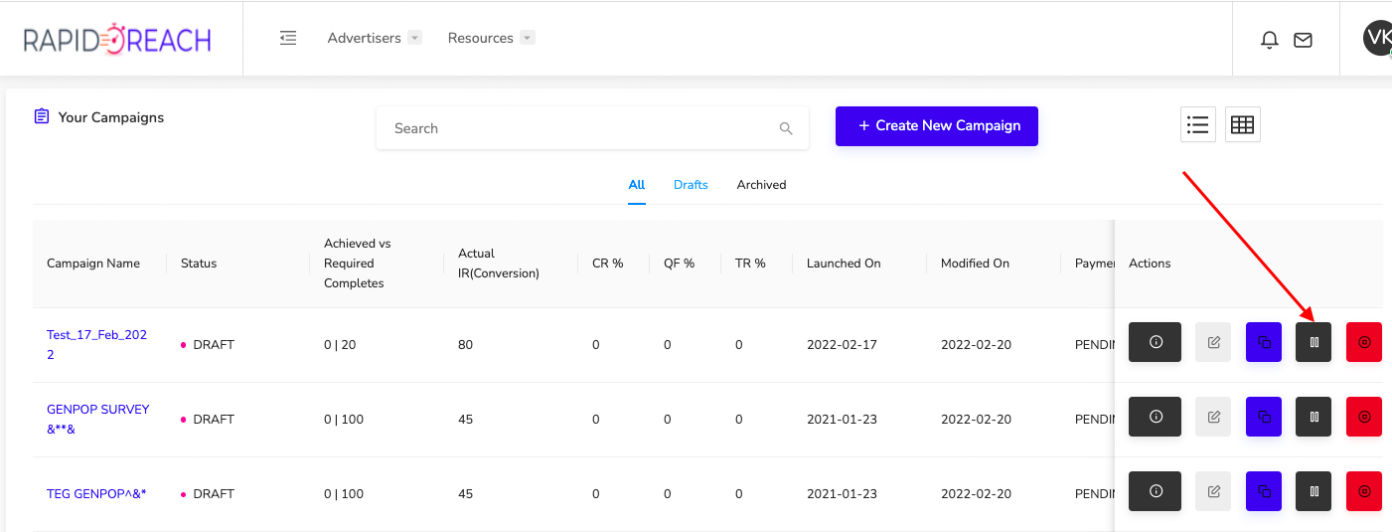
This will take you back into your Campaign builder and you can make any needed adjustments. You can edit your Campaign at any time. From there you can set the Campaign back to active or pause it.

Note: While you are editing your Campaign in the Campaign builder, the Campaign will be in a paused state and not collecting responses. The "Save & close" will leave this Campaign in a paused state, whereas the "Reactivate" will put this back in field as an active Campaign.
RapidoReach Monetization
Turn your app traffic into real revenue
Join 2,000+ publishers already boosting ARPU by up to 40% with in-app surveys. No SDK headaches — integrate in minutes.
Written By
Vishal Gautam
February 28, 2022